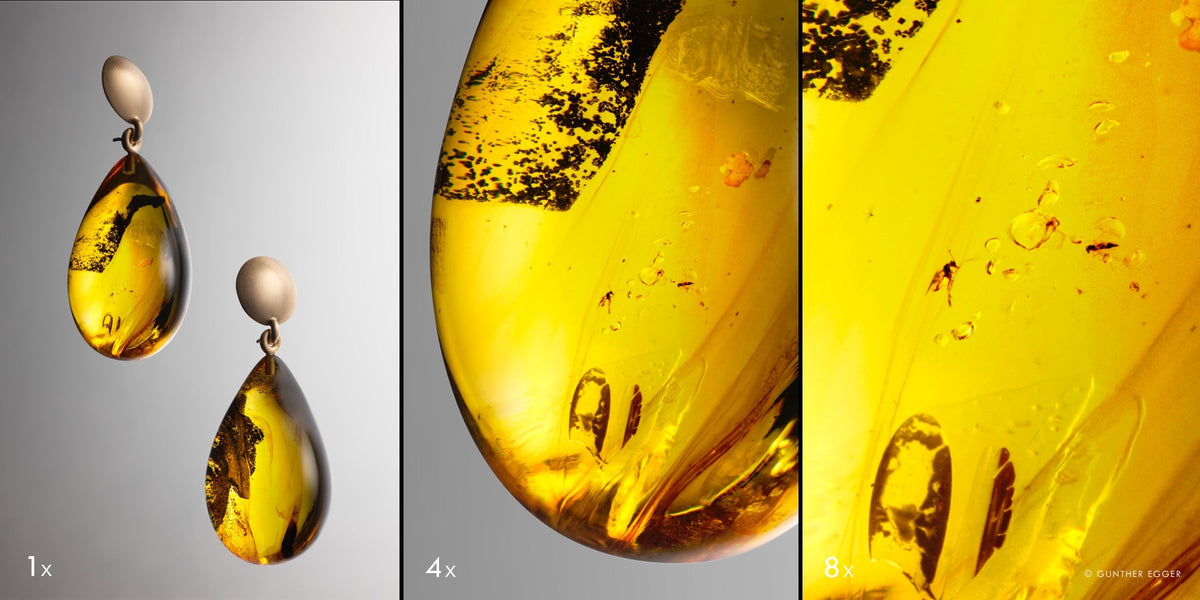
A camera for product photography must do more than simply capture a product in fine detail. It must capture shape, material, and colour in a way that can be repeated across an entire series. The image should work just as well on an online shop's product page as it does in a catalogue, a close-up view, or a large-format campaign visual.
What matters is the interplay of the sensor, lens, light, and software. The intended output determines the required resolution. The lens affects the perspective, working distance, and close-up rendering. Colour depth and dynamic range provide latitude for challenging surfaces, while tethering allows precise checks when the product remains untouched on set.
A suitable studio camera is therefore not an isolated technical component. It sits at the centre of a workflow in which every shot can be checked, every colour traced, and every perspective reproduced.
Which Camera Is Suitable for Product Photography?
The choice starts with the product and how it will be used. A series of simple cut-out shots calls above all for a stable process. Jewellery, watches, or technical components place greater demands on macro capability and depth of field. Campaigns add large-format output, extensive retouching, and a variety of crops.
Six characteristics determine how well a camera fits these tasks:
|
Criterion |
Relevance in the studio |
|
Resolution |
Detail views, crops, and different output sizes |
|
Lens system |
Perspective, working distance, close-up capability, and distortion |
|
Colour depth |
Differentiation of similar colours and smooth transitions |
|
Dynamic range |
Detail in reflections and dark materials |
|
Tethering |
Focus checks, approval, and series consistency |
|
Flash sync |
Independent control of flash and ambient light |
These criteria cannot be assessed independently of one another. High sensor resolution is of little use if the lens cannot render fine structures cleanly. Accurate colour depends on controlled lighting and a calibrated workflow. A reliable tethering system, in turn, prevents small errors from being discovered only after the product and lighting have already been changed.
The right camera is therefore the one that connects capture, control, and output without any breaks.
Output Determines the Required Resolution
The question of the right number of megapixels can only be answered once the intended output is fixed.
An A4 print at 300 PPI requires roughly 8.7 megapixels, while an A3 print needs about 17.4 megapixels. However, these figures only describe the final image area. In a real production, the full image is rarely output unchanged.
A product may first be photographed as a full view. Several detail crops are then created from it for the online shop. The printed catalogue needs a different aspect ratio, while a campaign calls for much larger formats and heavier retouching. Perspective corrections and aligning parallel lines further reduce the usable image area.
The actual requirement is therefore made up of three components:
planned output, necessary cropping margin, and latitude for retouching and layout
A moderate file size can make sense for a single web image, because loading time and production volume play an important role. If the same shot is used across multiple media, the calculation changes. A high-resolution source file makes it possible to derive different formats from a carefully built shot without prematurely sacrificing fine edges, surfaces, and lettering.
This is particularly noticeable with textiles, jewellery, packaging, and technical products. The texture of a fabric, a delicate engraving, or the transition between two materials must still be preserved even after a tighter crop. Here, resolution is not an end in itself but a reserve for later use.
However, it cannot make up for shortcomings in capture quality. More pixels only record camera shake, inaccurate focus, diffraction, or inadequate optics in greater detail. Only a stable set-up and a precisely matched capture chain make the additional information usable.
The Lens Determines the Perspective and Detail Rendering
In product photography, the lens determines how convincingly an object's proportions are rendered. The focal length changes not only the visible angle of view, but also the distance from which you can compose the desired image.
Focal Length and Working Distance
If a product is photographed from close up with a short focal length, parts nearer the camera appear larger than those further away. With a shoe, the front can look exaggerated; with packaging, the front and back can appear to diverge unnaturally. For a matter-of-fact depiction, standard or longer focal lengths are therefore often used.
The greater shooting distance does more than calm the perspective. It also creates room for the set-up.
There needs to be room between the camera and the product to position light shapers, flags, and reflectors. With polished metal, glass, or high-gloss lacquer, this space becomes particularly valuable. Such surfaces do not simply show the light; they reflect their entire surroundings. The camera, the tripod, or a sharp edge in the studio can show up as an unwanted shape on the product.
With a suitable focal length, you can position the camera further away from the critical reflection zone. Meanwhile, there is still enough room to deliberately shape bright and dark areas on the surface. The shape of a glossy product therefore comes less from direct lighting than from the controlled arrangement of what it reflects.
Macro and Close-Up Shots
With jewellery, watches, electronics, or delicate material samples, the reproduction ratio becomes a decisive criterion. A short minimum focusing distance on its own says little about how well a lens is suited to these kinds of tasks.
At close range, the lens should clearly separate fine structures while performing evenly across the relevant part of the frame. Meanwhile, the working distance must leave enough room for lighting and flags. If the front lens is too close to the product, lighting becomes more difficult, and the camera itself may show up in reflective surfaces.
A longer macro lens can ease this conflict. XCD 3,5/120 Macro is suitable both for close-up shots and for subjects where a longer shooting distance is desired. Its built-in leaf shutter enables flash synchronisation up to 1/2000 second. It therefore combines controlled close-up rendering with greater freedom in shaping the light.

@Lumen fragilis
Colour Accuracy Comes from the Entire Capture Process
Colour is not defined by the camera alone. Colour accuracy starts with the spectral composition of the light and changes along the way, passing through the sensor, RAW processing, monitor, and output profile.
A technically precise camera cannot reconstruct missing colour information if the light source used renders certain parts of the spectrum inadequately. Two lights with the same specified colour temperature can therefore make materials look different. This is particularly noticeable in skin tones, textiles, paints, or pigments with narrow colour ranges.
Light and White Balance
A repeatable colour workflow starts with stable light sources. Their colour characteristics should change as little as possible over the course of a series. Uncontrolled mixed lighting from flash, room lights, and window light, on the other hand, can cause colour shifts that show up differently on different surfaces.
A grey or colour reference should ideally be captured at the product's position. It creates a verifiable starting point for white balance and colour correction. Within a series, white balance should remain fixed. An automatic setting can vary from one product to another, even though the set-up remains unchanged.
The reference, however, is no substitute for visually assessing the actual object. Metallic paints, fluorescent pigments, pearlescent finishes, transparent plastics, and highly saturated textiles respond in complex ways to lighting and viewing angle. For critical brand colours, it is therefore essential to compare the product, the calibrated display, and the eventual output medium.
RAW, Colour Depth, and Output
RAW files retain more information for subsequent colour and tonal adjustments than an already exported JPEG. A higher colour depth becomes especially valuable when similar hues need to be precisely separated or gentle gradients need to be adjusted significantly.
In product photography, this often concerns inconspicuous areas: two almost identical fabric variants, a gradient on packaging, warm and cool reflections in metal, or the slight difference between black leather and an equally dark background.
X2D II 100C records 16-bit colour information and offers a dynamic range of up to 15.3 stops at ISO 50. This wealth of data provides a solid foundation for subtle colour correction and complex materials.
Hasselblad Natural Colour Solution combines the camera's individual calibration with its own colour processing. HNCS is designed to preserve natural colour relationships and smooth transitions from capture through to development in Phocus. It is not about creating an artificially neutral or subdued look. Red lacquer can glow; dark leather can have depth. What matters most is that colour, material, and light remain convincingly connected.
At the end of the workflow, the file must be adapted to the target medium. Web output calls for different colour spaces and contrast conditions than high-quality print. A soft proof can show, before output, how a specific print profile interprets colours and tonal values. This still requires a calibrated and profiled monitor.
Depth of Field and Focus Stacking
Products have spatial depth. The closer the camera gets to a small object, the narrower the area that appears sharp in a single shot. With a watch, the front crystal may already be out of focus while the dial is precisely in focus. With jewellery, the depth may extend from a stone at the front to the setting at the back.
A blanket aperture recommendation does not solve this problem. The available depth of field depends on the shooting distance, reproduction ratio, focal length, sensor format, and output size. Stopping down heavily does extend the geometrically sharp zone, but diffraction increasingly softens the finest detail.
Focus stacking is particularly useful when stopping down further would increase the depth of field, but at the same time weaken the microstructures that are important for the product. This involves taking a sequence of identical shots in which only the focal plane shifts step by step. Stacking software then merges the sharp areas.
The controlled studio set-up offers ideal conditions for this. The camera, product, and lighting remain unchanged throughout the sequence. Nevertheless, the process is not entirely automatic. Transparent edges, fine fibres, and abrupt contrast transitions can create artefacts when the images are merged. With high-gloss products, reflections can shift as the focus group moves within the lens.
The final file therefore needs to be checked at high magnification. Pay particular attention to:
-
glass and metal edges;
-
fine engravings and lattice structures;
-
textiles, hair, and fibres;
-
transparent or semi-transparent elements;
-
overlapping foreground and background details.
Phocus can run wired focus bracketing sequences via the Capture Sequencer. X, H, and 907X cameras are supported. The individual images are then combined in a suitable stacking application.
Precise sharpness thus comes from matching the aperture, focus distance, and capture sequence. It is not the result of using the smallest possible aperture.
Tethering Creates Control and Series Consistency
Tethering is often described as a way to view images instantly on a larger screen. In a professional product studio, its role goes much further.
With tethering, quality control becomes an integral part of shooting. A subtle scratch, a slightly skewed label, or an unwanted reflection becomes visible when the product remains untouched in the light. The shot can be reviewed together with art direction, styling, or retouching before the set is taken down.
This immediacy changes the way you work. Instead of being corrected afterwards, errors can be fixed at their source. A label is realigned, a reflector is moved, or a bit of fluff is removed. The next shot starts with an improved subject, not a longer to-do list for retouching.
With series, a second function comes into play: direct comparison. The current product can be displayed next to a reference shot. This reveals small differences in camera height, reproduction ratio, shadow fall, or product position. In this way, consistency is achieved on set rather than through adjustments made afterwards.
Checks that are particularly suited to the large screen include:
-
focus and fine material details;
-
labels, seams, and fastenings;
-
dust, fingerprints, and surface defects;
-
reflections in glass, metal, and foil;
-
parallel lines and product proportions;
-
background, shadow length, and edge spacing.
A professional tethering workflow also covers file organisation. The product number, shot variant, selection status, and storage location should be defined before the series begins. In this way, every shot enters the rest of the production process already correctly assigned.
Phocus combines tethered capture with lens-specific corrections and focus bracketing features. The software calculates optical corrections based on the lens in use, the shooting distance, and the aperture setting.
Flash Sync Enables Precise Light Control
In product photography, the flash often determines the actual exposure of the subject. The shutter speed mainly controls how much existing light contributes to the image.
With a focal-plane shutter, the standard flash sync speed is limited. Beyond it, the entire sensor is no longer exposed at the same time. By contrast, a leaf shutter is built into the lens and can synchronise the flash at any shutter speed supported by that particular lens.
In the studio, this opens up practical latitude. Window light can be reduced without having to adjust the power of the flash unit. A glowing display, a small light built into the product, or a bright outdoor area behind the set can be controlled independently of the flash exposure.
This separation also helps with movement. Liquid, powder, or a rotating element is frozen primarily by the short flash duration. Meanwhile, a faster synchronised shutter speed prevents existing continuous light from creating a second, blurred outline.
XCD lenses integrate the leaf shutter directly into the optics. XCD 3,5/120 Macro supports full flash sync up to 1/2000 second; selected newer XCD lenses reach up to 1/4000 second.
The benefit lies less in the maximum figure than in how the light is shaped. Flash and ambient light can be shaped separately, without either one dictating the entire capture process.
Camera Choice Follows the Production Goal
Not every product shoot requires the same weighting of resolution, speed, and file size. The choice should be guided by how often an image will be used and how much control the final output requires.
|
Production goal |
Key requirements |
|
Consistent e-commerce series |
Repeatability, tethering, and clear file organisation |
|
Jewellery and small objects |
Macro optics, working distance, and focus stacking |
|
Furniture and large products |
Perspective, suitable focal length, and sufficient shooting space |
|
Catalogue and campaign |
Resolution headroom, colour depth, and extensive retouching latitude |
|
Art and product reproduction |
Colour management, low distortion, and uniform sharpness |
In a large production for an online shop, a fast, clearly defined workflow can matter more than the largest possible file. The resolution should be high enough for zoom views and planned crops, without placing unnecessary strain on importing, selecting, and archiving.
For a campaign, the priorities shift. If a single shot has to serve multiple layouts, detail crops, and large print formats, greater demands are placed on the quality of the source file. Resolution, colour depth, and a dependable RAW workflow create room for later decisions here.
Jewellery and small technical parts, in turn, require suitable close-up optics, a controlled plane of focus, and often focus bracketing. Large products require more space, a calm perspective, and a focal length that does not unnecessarily alter their proportions.
The categories are not rigid boundaries. They show which characteristic has the greatest influence within a given production goal.
Integrated Workflow for Demanding Product Photography
When a shot has to work as a full view, a detail image, and a large-format campaign template at the same time, a high-resolution source file becomes more important. In the studio, however, this information must remain immediately checkable.
X2D II 100C combines a 100-megapixel medium-format sensor with 16-bit colour depth and a dynamic range of up to 15.3 stops. In a product shot, this combination creates room for fine materials, tight crops, and controlled transitions between bright highlights and dark surfaces.
For smaller products, XCD 3,5/120 Macro complements the camera with a longer working distance and rendering designed for close range. The leaf shutter synchronises the flash up to 1/2000 second, allowing the product exposure and the amount of ambient light to be controlled independently of one another.
On set, the shot appears directly in Phocus. Focus, labelling, and reflections can be checked before the product is moved. If the depth of field of a single shot is not sufficient, you can run a focus bracketing sequence. The lens-specific correction takes into account both the shooting distance and the aperture.
HNCS keeps colour reproduction consistent from capture through to RAW processing. The individual calibration and Hasselblad's colour processing are designed to ensure that product colour, material, and light remain in a natural relationship, even after contrast and tonal corrections.
In this way, the product is not presented in the article as an isolated recommendation. The camera, macro lens, and software each answer a specific studio requirement: resolution reserve, controlled close-up rendering, light control, immediate review, and consistent colour.
In the finished image, the technology takes a back seat. What remains visible is the texture of a material, the precision of a form, and the colour by which the product is recognised.
[cta: https://store-eu.hasselblad.com/de/products/x2d-ii-100c]
Frequently Asked Questions about Cameras for Product Photography
Do I need a tilt-shift lens for product photography?
A tilt-shift lens is particularly useful for large rectangular products, strictly parallel lines, or unusual planes of focus. Smaller products can often be captured accurately by choosing a suitable camera position, using a longer focal length, and applying moderate perspective correction.
How can moiré be reduced in textiles and fine patterns?
Moiré can be reduced by making small adjustments to the shooting distance, focal length, or camera angle. Even a slight adjustment to the output size can help. Critical patterns should be checked at full magnification during tethering and, if necessary, corrected locally during RAW processing.
Which files should be archived after a product shoot?
The archive should include the RAW master files, associated editing data, final TIFF or JPEG files, the colour profiles used, reference shots, and product information. At least one additional copy should be stored separately from the primary storage, either on a different type of system or in a different physical location.